

LandTrackPro Land Management Software developed by Noun Design, unites every party involved in land deed registration, ownership transfer, and dispute resolution on one platform. Agents, notaries, courts, municipalities, finance teams, and citizens work from the same system instead of passing paper files between offices. Applications move through review stages automatically, disputes are tracked from filing to mediation, and every department has a dashboard built for its exact job.
Land deed processing has involved too many stops. A deed application starts with an agent, moves to a notary for verification, then to a municipality for civil engineering and valuation checks, and sometimes ends in district court. Each stop meant a new form, file, and wait. LandTrackPro turns this chain of separate steps into one connected workflow that every party can see and track in real time.
The Problem LandTrackPro Land Management Software Solves
Deed registration is one of the most paperwork-heavy government processes. A single application can touch five or six offices before full approval. Each office keeps its own files, tracking sheet, and way of logging progress. When an applicant calls to check their case, staff often must phone another department to find out where the file physically sits.
This creates recurring problems. Applications sit untouched for days because nobody notices they are waiting in a queue. Documents get duplicated because one office does not know another already collected them. Disputes drag on because case history is scattered across desks instead of stored in one place. Citizens lose trust because they cannot get a straight answer about their application.
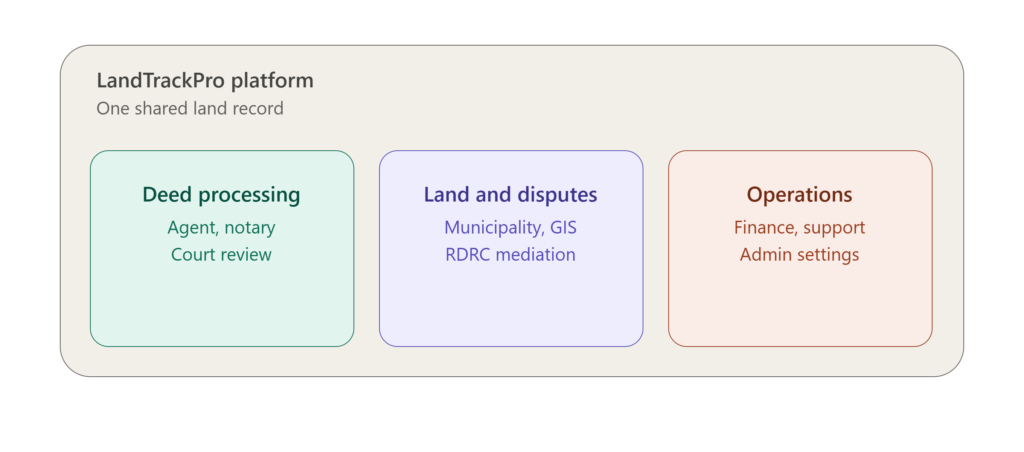
LandTrackPro8 – Land Management Software was built around this chain of handoffs. Instead of replacing the process, it gives every stop its own portal connected to the same underlying record. A property does not have five separate files across five offices. It has one record every authorized office can see, update, and act on.
One Platform, Many Portals
LandTrackPro – Land Management Software is not a single dashboard. It is a set of role-based portals, each built for the people who use it. An agent sees a different screen than a notary. A court reviewer sees a different queue than a municipality valuation officer. Everyone gets the tools they need and nothing they don’t.
The Life of a Deed Application
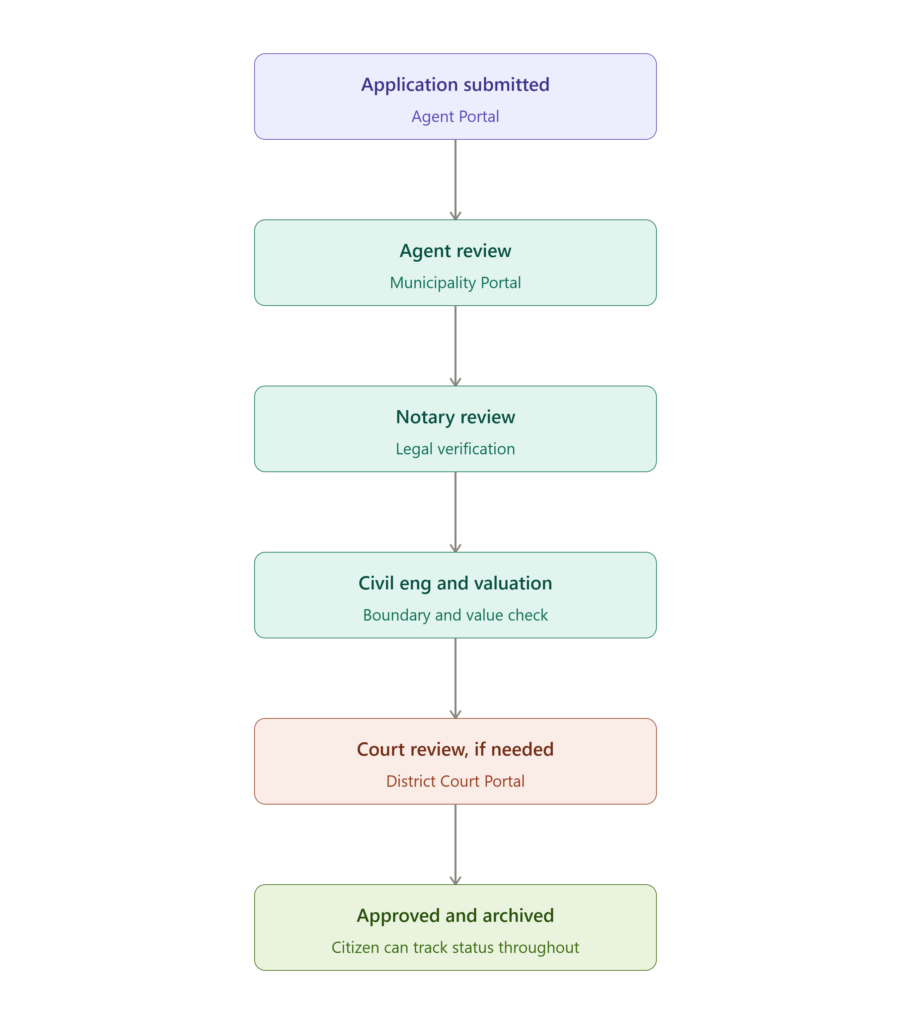
To understand why this structure matters, it helps to walk through what happens to a single deed application inside LandTrackPro – Land Management Software.
Submission. An agent submits a deed application through the Agent Portal, attaching property details, ownership documents, and any supporting files. The application enters the system with a status tag and a unique record tied to the property.
Agent Review. Municipal staff opens the application inside Agent Review Mode, checks that the submission is complete, and either sends it forward or flags it for correction. If something is missing, the agent gets a notification directly in their portal instead of a phone call or a returned envelope.
Notary Review. Once the application clears initial review, it moves into Notary Review Mode. The notary verifies the legal details, checks the attached documents, and confirms the transaction is legitimate before signing off.
Technical Review. Applications that involve construction, boundary questions, or land use compliance route to Civil Engineering Review Mode, where a technical reviewer checks the property against zoning and boundary data pulled from the GIS tools built into the Municipality Portal.
Valuation. Before final approval, the application moves through Valuation Review Mode, where staff assesses the property’s value for tax and fee purposes. This value gets attached to the record permanently, so the Finance Portal and tax teams always work from the same number.
Court Review, if needed. If a legal question or dispute is attached to the property, the application routes to either the District Court Portal or the Court Review Mode inside the Municipality Portal. Judicial staff reviews the case with full access to everything that happened at earlier stages.
Mayor Sign-Off. For applications that require executive approval, Mayor Review gives municipal leadership a final checkpoint before the deed is officially registered.
Archive. Once approved, the completed application and every document tied to it move into Archive Management, where it stays searchable and retrievable for future reference, tax records, or legal proceedings.
At every stage, the applicant can check their status through Citizen Access, and every action taken on the file is logged automatically. Nobody has to guess where an application sits or call to find out.
Agent Portal
Agents are usually the first point of contact in a land transaction. The Agent Portal gives them a home dashboard with a snapshot of their properties, active applications, and pending tasks. From there, agents can:
- Manage a full list of properties tied to their account
- Filter and search through active listings and applications
- Submit new deed applications and track their status from start to finish
- View selection tools that make it faster to match properties to buyer requirements
Real estate agents, brokers, and independent land agents get a single place to manage their entire pipeline instead of juggling paper folders for each client. Instead of keeping a personal spreadsheet of client applications, an agent can open their dashboard and see every case at a glance, sorted by status.
The portal includes filtering tools built for how agents search, by location, property type, price range, or application stage. An agent working with a buyer who has specific requirements can narrow down available properties in seconds instead of manually cross-referencing listings. When an application is flagged for correction further down the review chain, the agent sees it immediately in their dashboard instead of waiting for a call from the municipality.
For agencies managing multiple agents, this creates consistency. Every agent works inside the same structure, submits applications the same way, and gets status updates through the same channel, making it easier for agency leadership to track performance and caseload across the team.
District Court Portal
Some deed applications require court review, especially when there is a dispute or a legal question tied to the property. The District Court Portal gives court staff a dedicated queue for deed applications that need judicial review.
Court reviewers can open each application, see the full history behind it, and move it through approval or rejection stages. The portal separates applications by status using color-coded tracking, so staff can immediately see what is pending, what is flagged, and what has cleared review. Built-in reporting tools let court administrators track case volume and turnaround time across the district.
Because the full application history travels with the case, a judge or court clerk reviewing a deed dispute does not have to request records from the municipality separately. Every prior review, document, and note attached to the property is visible inside the portal. This reduces the back-and-forth that slows court review and gives judicial staff more confidence the record is complete.
The Applications view groups cases so staff can work through their queue methodically, and the Reports section, including a dedicated financial reporting view, gives court administrators a way to show caseload trends to oversight bodies or budget committees without pulling data manually from multiple sources.
Municipality Portal
The Municipality Portal is the busiest part of LandTrackPro – Land Management Software, because municipal offices sit at the center of the deed approval process. This portal includes several review modes, each built for a different department inside the municipality:
Agent Review Mode lets municipal staff review deed applications submitted by agents before they move further in the process.
Notary Review Mode gives notaries a queue of applications waiting for legal verification and notarization, with document preview built directly into the review screen.
Court Review Mode mirrors the district court queue inside the municipality system, so municipal legal staff can track applications that are working through judicial review.
Civil Engineering Review Mode routes applications that need a technical review, such as boundary checks or construction compliance, to the civil engineering department.
Valuation Review Mode sends applications to the valuation department, where staff assess property value for tax and transaction purposes before final approval.
Beyond these review modes, the Municipality Portal includes:
- GIS and Boundary Tools that connect deed applications to live map data, so staff can confirm boundaries visually instead of relying on written descriptions alone
- Mayor Review access for final sign-off on applications that require executive approval
- Citizen Access so residents can check the status of their own applications without calling or visiting the office in person
- Archive Management for storing and retrieving completed applications and historical land records
- Reporting Dashboards that show application volume, approval rates, and processing time across every department in the municipality
This structure means a deed application does not get lost between departments. It moves through agent review, notary review, civil engineering, valuation, and court review (if needed) inside one connected system, with a clear record of every step.
Each review mode works the same way at its core. A staff member opens a queue of applications assigned to their department, reviews the details and documents, and either approves the application to move forward or flags it with a note explaining what needs to change. This consistency matters. A civil engineer and a notary look at very different information, but the process of reviewing, approving, or flagging an application feels the same across departments, cutting down on training time for new staff.
The GIS and Boundary tools deserve special mention because they solve a problem that has caused countless disputes: two parties disagreeing about where a property line sits. Instead of relying on written boundary descriptions that can be interpreted differently, staff can pull up the actual mapped boundary and compare it directly against the application. This alone can prevent disputes from reaching the RDRC Portal.
Archive Management is worth noting. Municipal offices often struggle to retrieve old records, especially those predating digital systems. Once a record is digitized inside LandTrackPro, it stays searchable indefinitely. Staff can pull up a property’s full deed history from years earlier in seconds, which matters when a dispute or tax question involves a transaction from long before current staff started.
RDRC Portal (Dispute Resolution)
Land disputes are one of the hardest parts of land management to handle well. The RDRC Portal is built specifically for dispute intake, review, and mediation.
When a dispute is filed, it enters through Intake and Review, where staff log the details and assign it for handling. From there, the same Agent Review, Notary Review, and Court Review modes used elsewhere in the platform apply to disputes tied to deed applications, keeping the dispute process consistent with the rest of the system.
The portal also includes a Dispute Calendar for scheduling hearings and deadlines, along with Mediation Case Management tools that track each mediation session, the parties involved, and the outcome. This gives dispute resolution committees a clear, organized way to manage caseloads instead of tracking mediation manually across spreadsheets and paper files.
Disputes rarely resolve in a single sitting. A case might need three or four mediation sessions spread across several weeks, with different documents and notes attached to each one. The Mediation Case Management tools keep this history attached to the case itself, so a mediator picking up a session does not have to re-read a stack of notes to remember where things stood. The Dispute Calendar also helps committees avoid the scheduling conflicts that used to happen when hearings were tracked on paper calendars in different offices.
Because the RDRC Portal shares the same underlying record as the rest of the platform, a dispute tied to a deed application does not exist in isolation. Mediators can see the original application, the review history, and any documents submitted along the way, which gives them the full picture instead of only the pieces the disputing parties choose to bring forward.
Customer Support Portal
Every platform with this many moving parts needs strong support tools, and LandTrackPro builds this in directly. The Customer Support Portal includes:
- A Ticket Management system for logging and tracking support requests
- Live Support for real-time help with active issues
- A built-in FAQ and Guide library so users can solve common problems on their own
- A Feedback system for collecting input from users across the platform
- An Escalate Case feature for routing complex issues to the right team
- Support Analytics and Reporting so administrators can track ticket volume, response time, and resolution rates
This keeps every user, from a citizen checking on an application to a municipal officer managing a heavy caseload, supported without needing a separate help desk system. Support staff working through the Escalate Case feature can route a difficult issue directly to the department that owns it, whether that is a technical problem with an application or a question that needs a municipal officer’s input, instead of passing the citizen back and forth between offices.
The Support Analytics dashboard also gives administrators a way to spot patterns, such as a spike in tickets tied to a specific stage of the application process. If citizens keep asking the same question about valuation delays, that pattern shows up in the data, giving leadership a reason to look at whether the Valuation Review Mode needs more staff or a faster process.
Finance Portal
Land transactions come with financial data that needs its own space. The Finance Portal gives finance teams a dashboard focused on land-related revenue, including collection trends and financial summaries tied to deed processing and tax activity. This keeps financial oversight connected to the same records used across the rest of the platform, instead of living in a separate, disconnected system.
Because valuation figures set inside the Municipality Portal feed directly into the Finance Portal, revenue teams are always working from the most current property values instead of waiting for a separate update process. This matters most in offices where valuation and tax collection used to run on completely different schedules, which often led to billing based on outdated figures.
Admin Portal
The Admin Portal is where the entire platform gets configured and maintained. It includes:
- Portal Settings for controlling how each role-based portal behaves
- Departmental Settings for managing the structure of municipal departments inside the system
- User Profile Management for handling accounts, roles, and permissions across every portal
- Templates for standardizing forms and documents used throughout the deed process
- Tariff Settings for managing fees tied to applications, valuations, and services
- System Admin and System Sync tools for keeping data consistent across every connected portal
- NOC Center for managing No Objection Certificate requests and approvals
- Subscription Management for handling access plans across different offices or organizations
This gives administrators full control over how LandTrackPro runs without needing outside technical support for routine changes.
Mobile Access
Municipal staff and agents are not always at a desk. LandTrackPro’s core portals are built to work on mobile devices as well as desktop, so a civil engineer checking a boundary in the field or an agent meeting a client outside the office can still pull up the same dashboards and application data they would see at their desk. This matters most for review stages that involve site visits, since staff can log notes or check documents on location instead of waiting to get back to the office to update a file.
Security, Access Control, and Audit History
A platform that connects this many departments has to be strict about who can see what. LandTrackPro handles this through role-based access built into every portal. A notary cannot edit a court record. A citizen checking their own application cannot see another applicant’s file. Each role is scoped to exactly what that job needs, nothing more.
Every action taken inside the system, whether it is an approval, a flag, a document upload, or a status change, gets logged automatically. This creates a complete audit trail for every application and every dispute. If a question ever comes up about who approved a transaction or when a document was added, the answer is already recorded and cannot be altered after the fact.
For offices that handle sensitive land and financial data, this kind of built-in accountability matters as much as the workflow itself. It protects staff from accusations of mishandling a case, and it protects citizens from having their records altered without a clear record of who made the change.
Reporting Across the Platform
Nearly every portal in LandTrackPro includes its own reporting tools, built around what that department actually needs to track. The District Court Portal reports on case volume and turnaround time. The Municipality Portal reports on application flow and approval rates across departments. The Customer Support Portal tracks ticket volume and resolution time. The Finance Portal shows revenue and collection trends.
Because these reports pull from the same connected records instead of separate systems, the numbers stay consistent across departments. A municipal administrator pulling a report on deed processing time is looking at the same underlying data the Finance Portal uses to track collection, which means there is no risk of two departments reporting different numbers for what should be the same activity.
Multi-Role Access, One Account
LandTrackPro supports switching between roles from a single login. A user tied to more than one function, such as someone who works across both an agent role and a municipal review role, can switch dashboards without logging out and back in. This matters in smaller offices where staff often wear more than one hat, and it keeps the system flexible instead of forcing every user into a single fixed role.
Account setup covers standard sign-up and sign-in, along with password recovery built with clear error handling and confirmation steps, so users are never stuck without a way back into their account.
Built for Every Party in the Deed Process
Government and Municipal Bodies
Municipal offices get the most value from LandTrackPro because so many review stages run through them. The connected review modes, GIS integration, and reporting tools give municipal staff full visibility into every application moving through their office, without needing to check in with other departments manually. Department heads can also use the reporting dashboards to spot bottlenecks, such as a review stage where applications consistently sit longer than they should, and address staffing or process issues before they turn into a backlog.
Private Landowners and Citizens
Citizen Access gives private landowners a way to track their own deed applications and disputes without needing to call or visit an office. This alone removes a huge amount of friction from a process that used to require repeated in-person follow-up. A landowner who submitted an application through an agent can log in and see exactly which stage it has reached, whether that is notary review, valuation, or waiting on a court decision, without needing to track down the right person to ask.
Developers
Developers working on land acquisition benefit from the same visibility. Application status, boundary data, and valuation information are all trackable inside the system, which speeds up due diligence before a purchase closes. A developer evaluating several parcels can check zoning and boundary details through the GIS tools before committing time and money to a deal that might run into compliance issues later.
Real Estate Agencies and Agents
The Agent Portal is built specifically around how agents work day to day, from managing a property list to tracking applications through every review stage without needing to contact each department separately. Agencies with multiple agents also get a consistent process across the whole team, which makes it easier to onboard new agents and keep client-facing communication accurate.
Tax Collectors and Valuation Officers
The Valuation Review Mode and Finance Portal give tax and valuation staff a direct line into the data they need, tied to the same deed records used by every other department, so assessments stay consistent with the transaction history. Because valuation figures are permanently attached to the property record, there is no risk of a tax office working from an outdated number that a different department has already updated.
Notaries
Notary Review Mode gives notaries a dedicated queue for legal verification, with the documents and application history they need already attached, cutting down on back-and-forth requests for missing paperwork. A notary can move through a full day’s queue without needing to chase down a document that another office already has on file.
Courts and Legal Firms
Both the District Court Portal and the Court Review Mode inside the Municipality Portal give judicial staff and legal firms a clear view of cases tied to deed disputes, along with the full history needed to review or resolve them. Legal firms representing a client in a land dispute can rely on the same audit trail the court sees, which reduces disagreements about what actually happened at each stage of the process.
Dispute Resolution Committees
The RDRC Portal gives mediation teams dedicated tools for intake, scheduling, and case management, built specifically for how dispute resolution actually works instead of adapting general-purpose software to fit. Committees handling a heavy caseload benefit most from the Dispute Calendar, which keeps hearings organized across multiple mediators instead of relying on separate personal calendars that are hard to coordinate.
Surveying Firms
Surveying firms working on municipal or private contracts can reference the boundary and GIS data already stored inside LandTrackPro instead of starting a new survey from scratch every time. When prior survey data already exists for a parcel, firms can confirm and build on it rather than duplicating work that has already been done.
Why LandTrackPro
Every department works from the same data. Agents, notaries, courts, municipalities, and finance teams are no longer working off separate, disconnected files. One application moves through every stage inside one system.
Built around real government workflows. Review modes for Agent, Notary, Court, Civil Engineering, and Valuation match the actual approval chain used in deed processing, instead of forcing offices to adapt their process to generic software.
Dispute handling is built in, not bolted on. The RDRC Portal treats mediation and dispute resolution as a core part of land management, with its own calendar and case tools.
Citizens are not left out. Citizen Access gives the public a way to track applications directly, reducing office visits and phone calls.
Support is part of the platform. The Customer Support Portal means help is available without needing a separate ticketing system outside LandTrackPro.
Administration stays in-house. The Admin Portal gives offices full control over settings, templates, tariffs, and user roles without depending on outside vendors for routine changes.
Everything is traceable. From the moment an application is submitted to the moment it lands in the archive, every step is logged, timestamped, and tied to the person who took action, giving offices a level of accountability that paper files never could.
Getting Set Up on LandTrackPro
Bringing an office onto LandTrackPro follows a structured rollout so departments are not left figuring out the system on their own.
Department Mapping. Existing departments, such as agent registration, notary services, civil engineering, valuation, and court liaison, are mapped inside the Admin Portal’s Departmental Settings, so the review chain matches how the office is actually structured.
Record Migration. Existing deed records and property files are brought into the system and tied to searchable digital profiles, so historical data is available inside Archive Management from day one instead of staying locked in old paper files.
Role and Access Setup. User Profile Management is used to assign the right portal access to each staff member, based on their department and responsibilities, so nobody sees more or less than their role requires.
Template and Tariff Configuration. Standard forms are set up through Templates, and fee structures are configured through Tariff Settings, so applications follow consistent formatting and pricing from the start.
Staff Training. Each department gets walked through its specific portal and review mode, since a notary and a civil engineer use very different parts of the system day to day.
Go Live and Support. Once departments are set up and trained, the office moves fully onto LandTrackPro, with the Customer Support Portal available immediately for any questions that come up during the transition.
Frequently Asked Questions
Can one person access more than one portal?
Yes. LandTrackPro supports switching between role-based dashboards from a single account, which is useful for staff who work across more than one function.
How does a deed application move between departments?
An application moves through review stages such as Agent Review, Notary Review, Civil Engineering, Valuation, and Court Review as needed, with each stage tracked inside the same system so nothing gets lost between offices.
Can citizens track their own applications?
Yes. Citizen Access lets residents check the status of their deed applications without visiting or calling the office directly.
How are land disputes handled?
Disputes go through the RDRC Portal, starting with intake and review, then moving through the appropriate review modes, with a dispute calendar and mediation case tools to manage the process from start to resolution.
Does the platform include GIS or mapping tools?
Yes. The Municipality Portal includes GIS and boundary tools that connect deed applications to live map data.
What kind of support is available for users?
The Customer Support Portal includes ticket management, live support, an FAQ library, feedback tools, and case escalation, so users at every level get help without leaving the platform.
Can administrators customize the platform for their office?
Yes. The Admin Portal covers portal settings, departmental structure, templates, tariff settings, and user roles, giving administrators direct control over how the system runs.
Can staff access the platform from the field?
Yes. Core portals work on mobile devices, so staff conducting site visits or field reviews can access the same application data they would see at a desk.
Is there a record of who made changes to an application?
Yes. Every action taken on an application, including approvals, flags, and document uploads, is logged automatically, creating a full audit trail for every case.
How does LandTrackPro handle old paper records?
Existing paper files are digitized during onboarding and added to Archive Management, so historical records become searchable alongside new digital applications.
Get Started With LandTrackPro
LandTrackPro brings agents, notaries, courts, municipal departments, finance teams, dispute resolution committees, and citizens into one connected system for deed registration and land management. Every application, every review stage, and every dispute stays trackable from the first submission to final approval.
Reach out to see how LandTrackPro can bring your office’s deed process into one platform built around how the work actually happens.